State Management Pattern
State management LWC Pattern app. Brings data flow control and reactive programming approach to your apps.
Separate business logic from view implementations.
This example targeting two topics:
- How to bootstrap a single source of data and have direct access to it irregardless of how deep your component tree is
- Shows how state management can be injected into the app. This repo uses nanostores library but it can be safely replaced with effectorJS, redux toolkit, MobX, or whatever js
Pattern
Store Component
Singleton pattern utilized to communicate between the components
class Store {
    // Business logic that is public to the componenets
    $counter = Nanostores.atom(0);
    updateCounter = () => $counter.set($counter.get() + 1);

    constructor(context) {
        // Singleton pattern
        // Make sure store initialized only once
        if (Store.instance) {
            return Store.instance
        }
        Store.instance = this;
    }

    // Reset store when it is no longer needed
    reset = () => {
        $counter.set(0);
    }
}

export class MyStore extends LightningElement {
    store;

    async connectedCallback() {
        // Make sure parent's connectedCallback is called
        if (super.connectedCallback) {
            super.connectedCallback();
        }

        // Load required scripts then initialize store
        // LWC will do fetch only once and then reuse cached scripts
        await Promise.all([
            loadScript(this, myStaticResource + '/lodash.min.js'),
            loadScript(this, myStaticResource + '/nanostores.min.js')
        ]);
        this.store = new Store();
    }
}
App Component
Extend the store component and communicate with it via this.store property.
Make sure await super.connectedCallback() is called and awaited.
Scripts will be loaded and store initialized only once as soon as first component is connected (lazy loading).
import {MyStore} from 'c/myStore';

export default class TodoCounter extends MyStore {

    subscribers = [];

    async connectedCallback() {
        await super.connectedCallback();

        this.subscribers.push(
            this.store.$counter
                .subscribe(data => console.log(data))
        )
        // => 0

        this.store.updateCounter();
        // => 1
    }

    disconnectedCallback() {
        // unbind subscribers to prevent data leaks
        this.subscribers.forEach((unbind) => unbind());
        // data in the singleton store persists as long as the Lightning UI remains active in the browser until refresh.
        // clean up when the app is disconnected e.g., when leaving the page.
        this.store.reset();
    }
}
Usage
- Copy internals and match it with your folder structure
- Component
AqLib/lwc/state-management/TodoApp/lwc/todoStorefollows the pattern to implement the Store.- Copy the component, rename it and adjust for your app needs
- If you have multiple apps you might need to create store component for every app
- Delete Sample App
force-app/TodoApp
Folder Structure
Proposed folder structure has a nested structure. Feel free to use it (sfdx support > 7.149.1) or flatten based on your needs. It is stored flat in salesforce anyway
└── AqLib/lwc/state-management/
    ├── main - Project shared artifacts
    │   ├── lwc
    │   │   ├── mixins - mixins pattern to easily extend components
    │   │   └── constants - js constants and labels
    │   └── staticresources
    │       └── appDependencies
    │           ├── nanostores.min.js - store management lib
    │           └── lodash.min.js - common usage js helpers
    ├── TodoApp - App artifacts
        └── lwc
            ├── todoStore - app store component, stores business logic
            ├── todo - Todo app container. Can be placed on Layout
            ├── todoCounter - Counter of todos. Can be placed on Layout
            └── todo* - app internal componenets
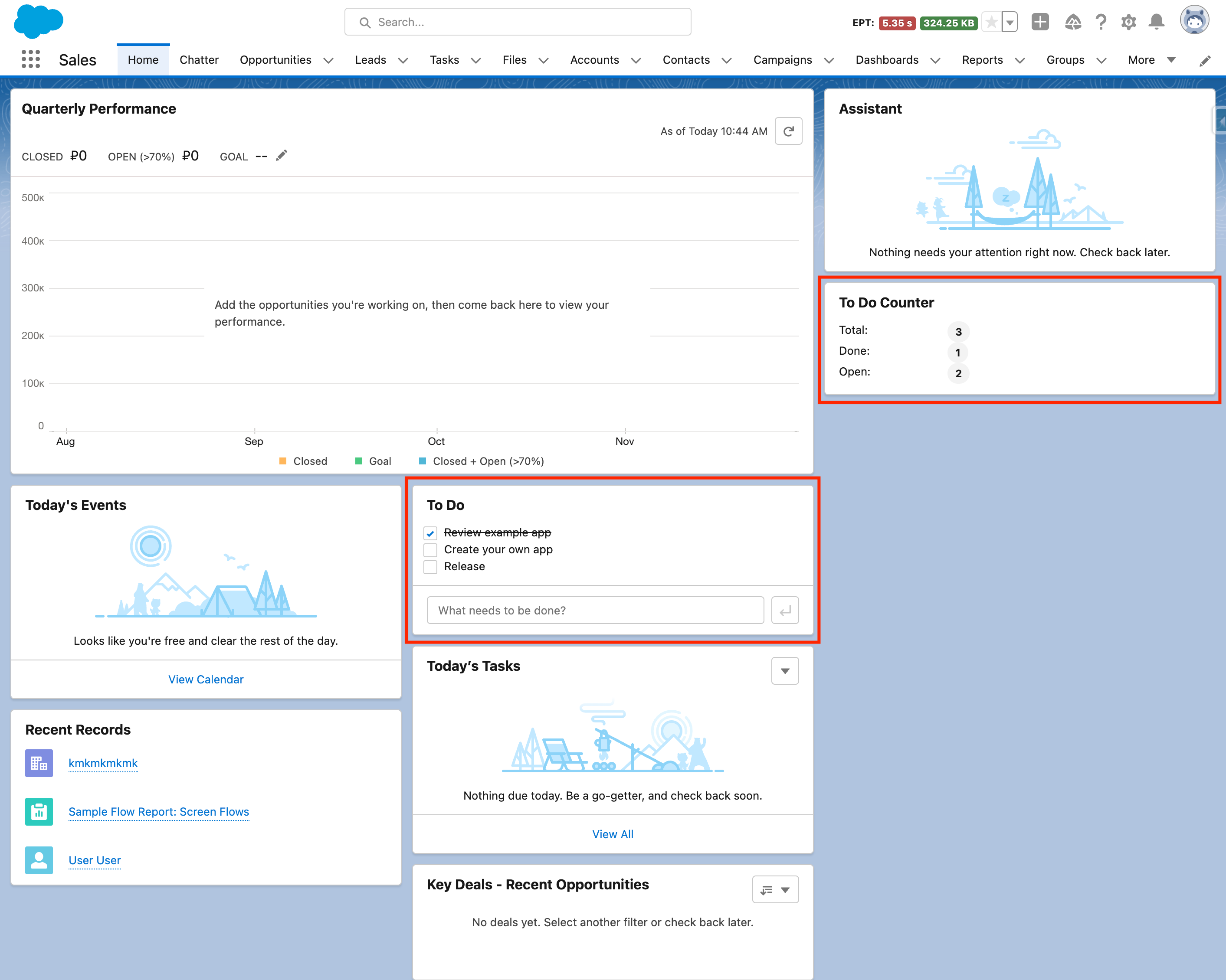
To Do App Example
Inside this repo there is an example To Do App that can be deployed to scratch org to play with
Dependencies
- nanostores ( github.com/nanostores/nanostores )
- _.lodash (4.17.21)
Learn more
Nanostores ecosystem
EffectorJS - alternative store library
- ☄️ effector ( https://effector.dev )
- 42-px/effector-forms (https://github.com/42-px/effector-forms)
- effector documentation
- Youtube lections
- Worth reading for better store data architecture
https://redux.js.org/usage/structuring-reducers/normalizing-state-shape - Effector community
- Effector ecosystem awesome list https://github.com/effector/awesome
- Aquiva LWC Best Practicies (State management & Pub Sub pattern)
https://aquiva.atlassian.net/wiki/spaces/STAN/pages/3636690964/LWC+Lightning+Web+Components+Best+Practices#Architecture